
Cats-Actors 2.1.0 Goes Cross-Platform
 Imagine writing your actor logic once (typed messages, functional state, the
 ! operator, supervision and all) and then deciding on a whim whether it runs as a JVM service, a self-contained native binary, or a live interactive app in your browser. No rewrites, no ports, no platform-specific glue. Just one codebase. Cats-Actors can do that now, and in this post we are going to have some fun with it. We will throw a token around a ring of actors on both JVM and Scala Native, and then (because why not) we will drop eight monkey actors into a banana-throwing arena right here inside this page. Real actors. Real messages. Running in your browser.
Setting Up Your Project
To get started you will need to configure your project as a cross-project so sbt can compile to all three targets.
Adding Dependencies
Add JitPack to your resolvers and pull in cats-actors using the %%% triple-percent operator, which selects the right artifact for each platform automatically:
resolvers += "jitpack" at "https://jitpack.io"

libraryDependencies += "com.github.suprnation.cats-actors" %%% "cats-actors" % "2.1.0"
Then declare a cross-project in your build.sbt:
import org.portablescala.sbtplatformdeps.PlatformDepsPlugin.autoImport._
import scala.scalanative.build._

ThisBuild / scalaVersion := "2.13.18"

lazy val myProject = crossProject(JVMPlatform, JSPlatform, NativePlatform)
  .crossType(CrossType.Full)
  .settings(
    libraryDependencies ++= Seq(
      "com.github.suprnation.cats-actors" %%% "cats-actors" % "2.1.0"
    )
  )
  .nativeSettings(
    nativeConfig ~= {
      _.withLTO(LTO.none)
        .withMode(Mode.releaseFull)
        .withGC(GC.immix)
    }
  )
With CrossType.Full you get separate jvm/, js/, and native/ source trees alongside the shared one. Everything in shared/ compiles everywhere. Platform-specific code lives in its own tree, and the build wires it in automatically.
From there, running on any platform is just a target name:
sbt "myProjectJVM/run"      # JVM
sbt "myProjectJS/run"       # Node.js
sbt "myProjectNative/run"   # Scala Native binary
Note: to view and run all code samples discussed in this blog post, clone the GitHub repository.
Racing JVM Against Native
The actor ring benchmark is a classic. Popularised by Erlang, it has been used to compare actor systems for decades. Create a ring of N actors, inject a single token, and let it travel totalHops times around the ring. Each relay is one message send. Measure the total time. Same code, two platforms, see what happens.
The full code lives in sample7 in the repository, but let’s walk through it.
The Ring Actor
Each actor in the ring does exactly one thing: if the token still has hops remaining, pass it to the next actor. When the count hits zero, signal that the relay is done.
final case class RingToken(remaining: Long)

final class RingNode(
    index: Int,
    ringSize: Int,
    slots: Ref[IO, Option[Vector[ActorRef[IO, RingToken]]]],
    done: Deferred[IO, Unit]
) extends Actor[IO, RingToken] {

  override def receive: Receive[IO, RingToken] = {
    case RingToken(0L) =>
      done.complete(()).void
    case RingToken(r) if r > 0L =>
      for {
        vecOpt <- slots.get
        vec    <- vecOpt match {
          case Some(v) => IO.pure(v)
          case None    => IO.raiseError(new IllegalStateException("ring not wired"))
        }
        next = vec((index + 1) % ringSize)
        _    <- next ! RingToken(r - 1L)
      } yield ()
    case _ => IO.unit
  }
}
Breaking Down the RingNode
-
The token:
RingTokencarries a single field,remaining, counting down fromtotalHopsto zero. That is all that ever travels on the wire. -
The ring topology: The vector of actor refs is stored in a
Refbecause all nodes are spawned before any of them know about the others. The harness wires them up in a second pass by callingslots.set(Some(refs)). -
The completion signal:
doneis aDeferred[IO, Unit], a one-shot, semantically blocking signal. When the last hop arrives,done.complete(())fires and unblocks the harness that is waiting ondone.get. No polling, no shared mutable variable. -
The send:
next ! RingToken(r - 1L)is the fire-and-forget send, pure functional IO, the same whether this code runs on the JVM or compiles to a native binary.
Wiring and Firing
The benchmark harness spawns the ring, wires it, fires the first token, and waits:
private def runOnce(system: ActorSystem[IO], runId: String, cfg: Config): IO[FiniteDuration] = {
  val n    = cfg.ringSize
  val hops = cfg.totalHops

  for {
    done     <- Deferred[IO, Unit]
    slots    <- Ref[IO].of[Option[Vector[ActorRef[IO, RingToken]]]](None)
    refsList <- (0 until n).toList.traverse(i =>
      system.actorOf(new RingNode(i, n, slots, done), s"ring-$runId-$i")
    )
    refs = refsList.toVector
    _    <- slots.set(Some(refs))
    t0   <- Clock[IO].monotonic
    _    <- refs(0) ! RingToken(hops)
    _    <- done.get
    t1   <- Clock[IO].monotonic
  } yield t1 - t0
}
Run it yourself:
# JVM
sbt "sample7JVM/run"

# Scala Native (compile first, then run the binary directly)
sbt "sample7Native/nativeLink"
./sample7/native/target/scala-2.13/native/com.suprnation.Sample7
You can tune things via environment variables (SAMPLE7_RING_SIZE, SAMPLE7_TOTAL_HOPS, SAMPLE7_WARMUP_RUNS, SAMPLE7_MEASURED_RUNS) or pass them as CLI flags. The same benchmark also runs on Node.js via sample7JS/run — useful for a quick sanity check, though the browser target is where Scala.js really comes into its own, as you will see in the next section.
Sample Output :log:
Here is what the Native binary prints for ring size 64 with 1M hops:
=== Sample 7: actor ring (token relay) ===
Startup (entry → actor system ready): 0.21 ms
Ring size: 64, total hops: 1000000
Warmup: 1, measured: 3

[warmup 1] elapsed: 11.612 s
[run 1] elapsed: 11.498 s
[run 2] elapsed: 11.541 s
[run 3] elapsed: 11.573 s

Median elapsed: 11.541 s
Stddev elapsed: 0.033 s
CV (consistency): 0.3%  (lower = steadier)
Median throughput: 86696.41 messages/s
Median latency: 11541.000 ns per hop
0.21ms startup, 0.3% CV. Now run the same config on the JVM and the startup jumps to 127ms, CV climbs to 6.6%, but throughput reaches 111k msg/s and keeps climbing with ring size. Two different trade-offs, same actor code.
The Numbers
Results from a sweep across ring sizes of 32, 64, 128, and 256 with 1M total hops:
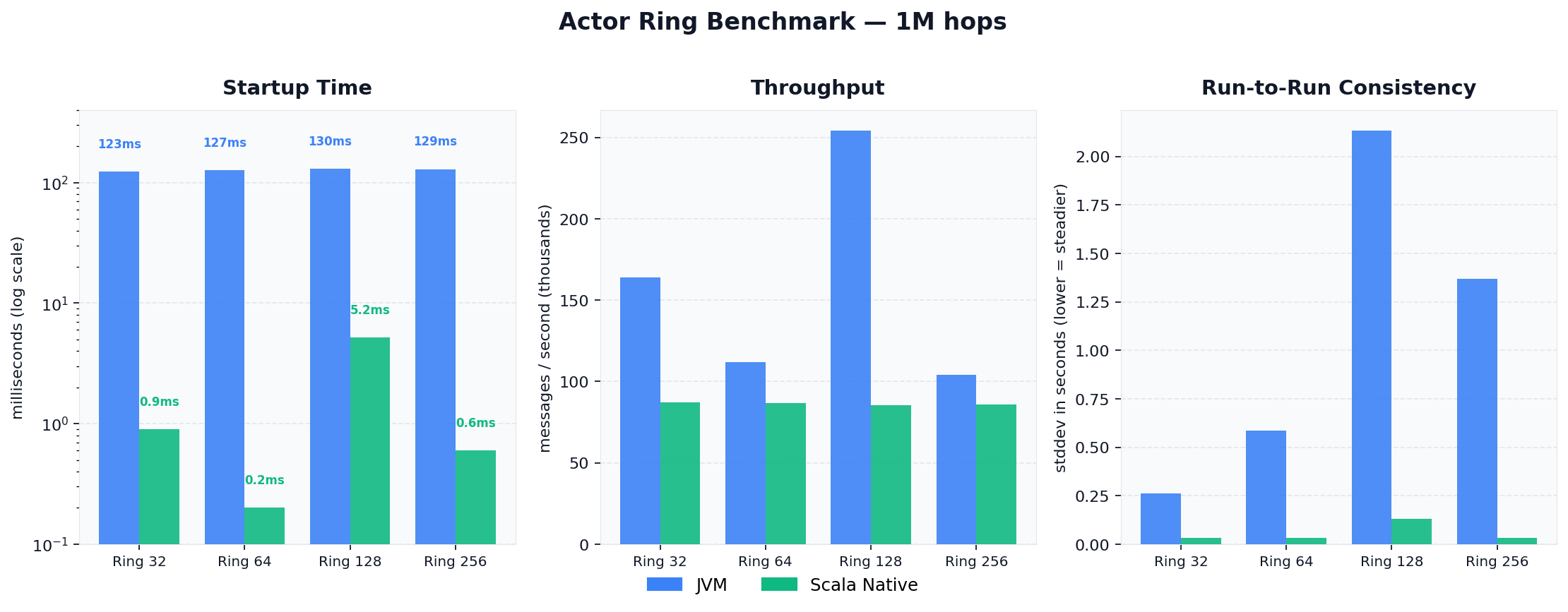
Native starts up in under 6ms across every ring size while the JVM costs over 120ms at startup. After warmup the JVM pulls ahead on throughput, reaching over 250k messages per second at ring size 128, because the JVM’s just-in-time compiler observes the hot loop at runtime and generates optimised machine code for it, something a statically compiled binary cannot do. Native compiles once ahead of time and runs at a fixed speed, which is why its throughput is steady but does not accelerate with load. The consistency column reflects exactly this: Native’s stddev stays flat and low throughout while the JVM varies more between runs. If you need a process that starts instantly and runs predictably, Native is the right choice. If you need maximum sustained throughput on a long-running service, the JVM takes it. Same actor code, both options open.
Eight Monkeys in the Browser
OK now we are having fun.
Meet Kong, Bonzo, Coco, Mango, Peaches, Bandit, Zippy, and Bubbles. Eight monkey actors spawned into an arena. Each round, every living monkey picks a random target and throws a banana at them. The target has a 25% chance to dodge. Take enough hits and you are out. Last monkey standing wins.
Every banana throw is a real actor message send using the ! operator. The monkeys are making decisions, updating their own state, and communicating asynchronously, exactly as you would write production actor code. And on Scala.js, every event feeds a live React UI running right here in the page.
Go ahead, watch the battle unfold. 
Not a single line of JavaScript was written. Those are Scala actors, compiled to JS via Scala.js, rendering a React UI through the Slinky bindings. The full code is in sample8 in the repository.
The MonkeyActor
Each monkey holds its own state in a Ref[IO, MonkeyState] and receives three kinds of messages:
sealed trait ArenaMessage
final case class Tick(round: Int)                              extends ArenaMessage
final case class IncomingBanana(fromId: Int, fromName: String) extends ArenaMessage
final case class ThrowResult(targetId: Int, hit: Boolean)      extends ArenaMessage
On a Tick, a monkey picks a target and throws:
case Tick(_) =>
  for {
    me <- state.get
    _  <- if (me.health <= 0 || me.bananas <= 0) IO.unit else throwBanana(me)
  } yield ()
throwBanana finds a living target, decrements the banana count, and sends an IncomingBanana to the target actor:
private def throwBanana(me: MonkeyState): IO[Unit] =
  for {
    targets <- allStates.traverse(_.get).map(_.filter(s => s.health > 0 && s.id != id))
    _ <- if (targets.isEmpty) IO.unit else {
      val target = targets(rng.nextInt(targets.size))
      for {
        _       <- state.update(s => s.copy(bananas = s.bananas - 1, throws = s.throws + 1))
        _       <- PlatformInterop.appendVisualLog(s"🍌 $name throws at ${target.name}!")
        _       <- PlatformInterop.onBananaThrown(id, target.id)
        monkeys <- registry.get
        _       <- monkeys(target.id) ! IncomingBanana(id, name)
      } yield ()
    }
  } yield ()
On the receiving end the target rolls the dice (25% dodge chance, otherwise take the hit):
private def receiveBanana(me: MonkeyState, fromId: Int, fromName: String): IO[Unit] = {
  val dodged = rng.nextInt(100) < 25
  for {
    monkeys <- registry.get
    _ <- if (dodged) {
      PlatformInterop.appendVisualLog(s"💨 ${me.name} dodges!") *>
      (monkeys(fromId) ! ThrowResult(id, hit = false))
    } else {
      for {
        updated <- state.updateAndGet(s => s.copy(health = s.health - 1))
        _       <- PlatformInterop.appendVisualLog(s"💥 ${me.name} hit! HP: ${updated.health}")
        _       <- monkeys(fromId) ! ThrowResult(id, hit = true)
        _       <- if (updated.health <= 0)
                     PlatformInterop.appendVisualLog(s"☠️  ${me.name} is out!") *>
                     PlatformInterop.onMonkeyEliminated(id)
                   else IO.unit
      } yield ()
    }
  } yield ()
}
Notice the thrower always gets a ThrowResult back. Actors closing the loop, idiomatic actor design.
One Trait, Three Platforms
Here is the clever part. The shared actor code never touches any platform-specific API. Instead it calls through a single trait:
trait PlatformInteropApi {
  def appendVisualLog(line: String): IO[Unit]
  def onBananaThrown(fromId: Int, toId: Int): IO[Unit]
  def onMonkeyEliminated(id: Int): IO[Unit]
  def onScoreUpdate(scores: List[(Int, String, Int, Int)]): IO[Unit]
  def checkRestart: IO[Boolean]
  def resetArena(): IO[Unit]
}
On JVM and Native it is minimal, just print to the console and move on:
// JVM and Native
object PlatformInterop extends PlatformInteropApi {
  override def appendVisualLog(line: String): IO[Unit]         = IO.println(line)
  override def onBananaThrown(fromId: Int, toId: Int): IO[Unit] = IO.unit
  override def onMonkeyEliminated(id: Int): IO[Unit]           = IO.unit
  // ...
}
On Scala.js, every call feeds the live React arena above:
// JS (browser)
object PlatformInterop extends PlatformInteropApi {
  override def appendVisualLog(line: String): IO[Unit]         = IO(ReactShowcase.append(line))
  override def onBananaThrown(fromId: Int, toId: Int): IO[Unit] = IO(ReactShowcase.addProjectile(fromId, toId))
  override def onMonkeyEliminated(id: Int): IO[Unit]           = IO(ReactShowcase.eliminateMonkey(id))
  override def checkRestart: IO[Boolean]                       = IO(ReactShowcase.consumeRestart())
  // ...
}
ReactShowcase manages state through an AtomicReference and runs a 50ms paint loop that re-renders the SVG arena. Click restart and the shared actor code picks it up automatically, same functional IO loop across all three platforms.
Running Locally
cd sample8
sbt "starterJS/fastLinkJS"
npm install && npm run dev
# open http://localhost:5173
Conclusion 
The same actor. The same receive. The same !. Running on a JVM, compiled to a native binary, or animating a banana war in your browser. That is Cats-Actors now.
A huge thank you to Rémi Lavolée and Nick Childers for making this possible.
Check out the Cats-Actors repository and clone the cats-actor-sample repository, pick a platform, and get hacking.
As always, stay safe, keep hacking!